Artificial Intelligent
What is an MCP Server?
Model Context Protocol (MCP) is changing how AI interacts with the tools we use every day. Learn what MCP Servers are, how they work, how they connect AI to external tools and data, and why MCP is becoming an important technology for building powerful AI agents.
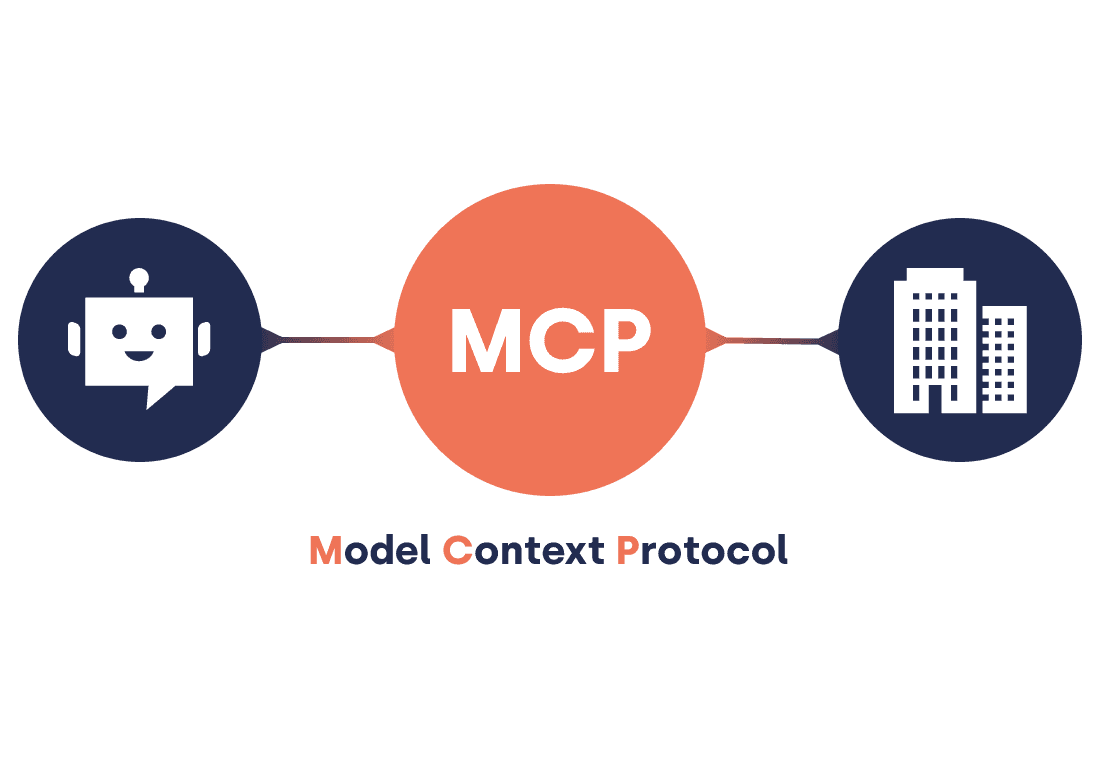
While Artificial Intelligence has made monumental strides in natural language generation, code synthesis, and complex problem-solving, foundational models historically operated within a strict digital vacuum. For a long time, Large Language Models (LLMs) were constrained by a fundamental limitation: they lacked a native, standardized mechanism to directly interact with the everyday tools, local environments, and enterprise data sources that developers and businesses depend on.
Imagine asking an AI assistant to execute a multi-system workflow:
"Analyze my latest GitHub issues, generate a corresponding Jira ticket, update our internal Notion architecture documentation, and trigger the staging deployment pipeline."
A traditional AI model could only provide instructions on how you might manually execute these tasks; it possessed no direct interface to perform the actions on your behalf. The Model Context Protocol (MCP) was explicitly designed to resolve this operational boundary, establishing a unified architectural bridge between artificial intelligence models and the broader digital ecosystem.
What is MCP?
The Model Context Protocol (MCP) is an open-source specification that standardizes how artificial intelligence applications securely communicate with external tools, local filesystems, remote databases, and third-party APIs through a universal protocol.
To understand its utility, consider the universal adoption of USB-C in modern hardware architecture.
- Before USB-C: Every hardware device required a specialized cable, custom port, and proprietary power standard, resulting in fragmented setups and high user friction.
- After USB-C: A single, open standard accommodates power delivery, data transfer, and display output across virtually any hardware peripheral.
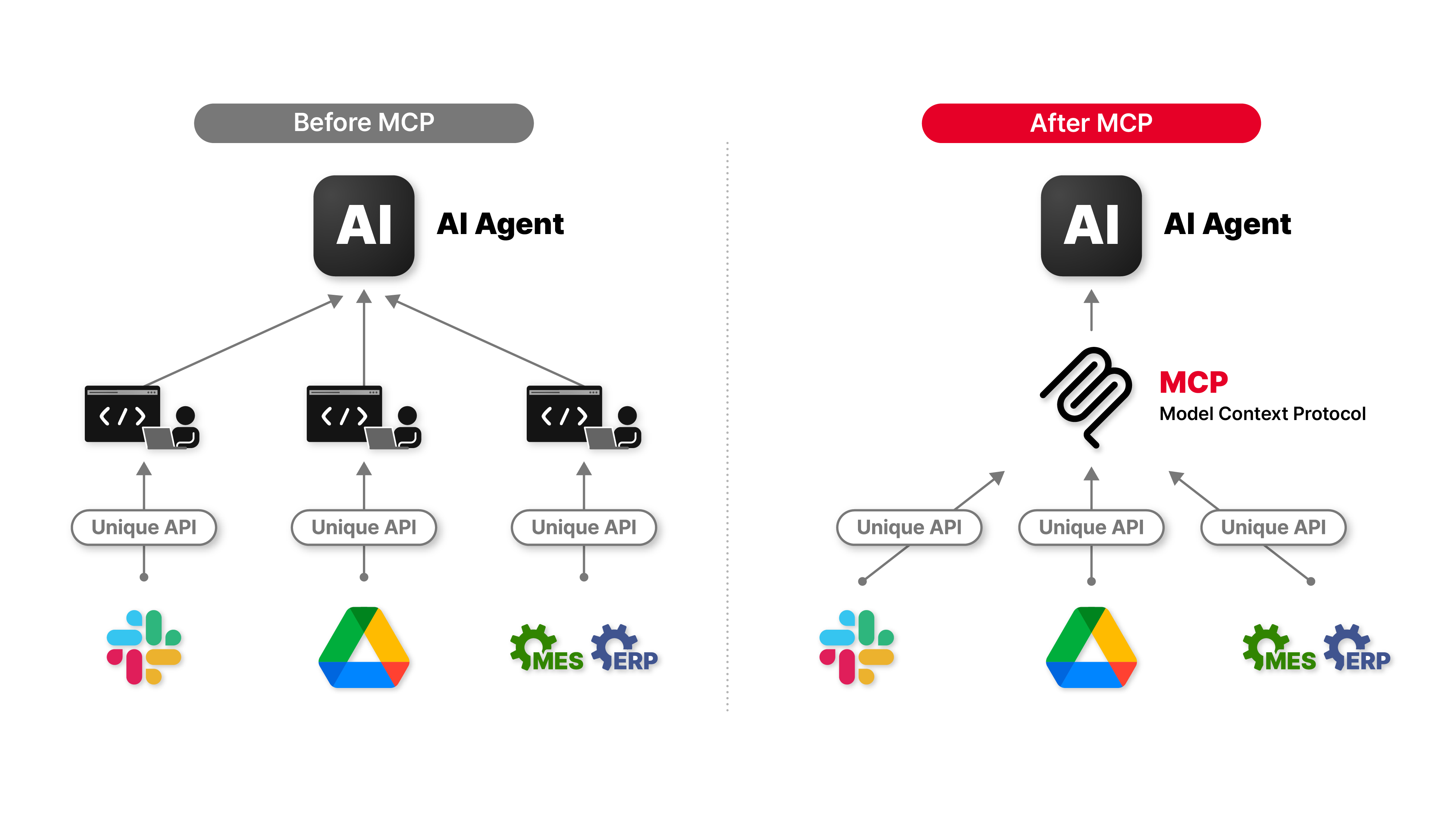
MCP operates as the software equivalent of USB-C for the generative AI era. Rather than building custom API connectors between every individual AI assistant and every enterprise service, developers construct a single MCP-compliant server. Once deployed, any AI application that supports the protocol can immediately interface with that server.
The Architectural Shift
Instead of building fragmented, one-off integrations:
ChatGPT  ───> Custom Adapter ───> GitHub API
Claude   ───> Custom Adapter ───> GitHub API
Cursor   ───> Custom Adapter ───> GitHub API
VS Code  ───> Custom Adapter ───> GitHub API
Developers create a single, highly reusable service:
                        +-----------------------+
                        |   GitHub MCP Server   |
                        +-----------+-----------+
                                    |
     +-----------------+------------+------------+-----------------+
     |                 |                         |                 |
     v                 v                         v                 v
+---------+       +---------+               +---------+     +--------------+
| ChatGPT |       | Claude  |               | Cursor  |     | Any MCP Host |
+---------+       +---------+               +---------+     +--------------+
This decoupled architecture establishes a standardized communication standard, enabling a rich ecosystem of compatible clients and tools to interoperate seamlessly.
Why Was MCP Created?
Prior to the introduction of MCP, attempting to connect an AI assistant to external software systems resulted in a complex, unsustainable $M \times N$ integration framework.
Suppose an engineering organization wanted an AI assistant to interact with its core technical infrastructure:
- Version Control Systems (GitHub, GitLab)
- Cloud Storage Repositories (Google Drive, AWS S3)
- Production Databases (PostgreSQL, Redis)
- Internal Communication Hubs (Slack, Microsoft Teams)
- Knowledge Management Platforms (Notion, Confluence)
- Local Filesystems and Terminals
Without a standardized protocol, every AI software vendor had to re-engineer, test, and maintain separate connectors for every target platform.
AI Application A                           AI Application B
├── Custom GitHub Integration               ├── Custom GitHub Integration
├── Custom Slack Integration                ├── Custom Slack Integration
├── Custom Postgres Integration             ├── Custom Postgres Integration
└── Custom Notion Integration               └── Custom Notion Integration
This structural redundancy severely hindered development speed and introduced substantial maintenance overhead across the industry. Every update to a backend API required individual fixes across dozens of distinct AI applications. MCP resolves this systemic issue by decoupling the AI host interface from underlying tool implementations through a shared runtime protocol.
How MCP Works
The Model Context Protocol establishes a clean client-server architecture composed of three primary operational layers.
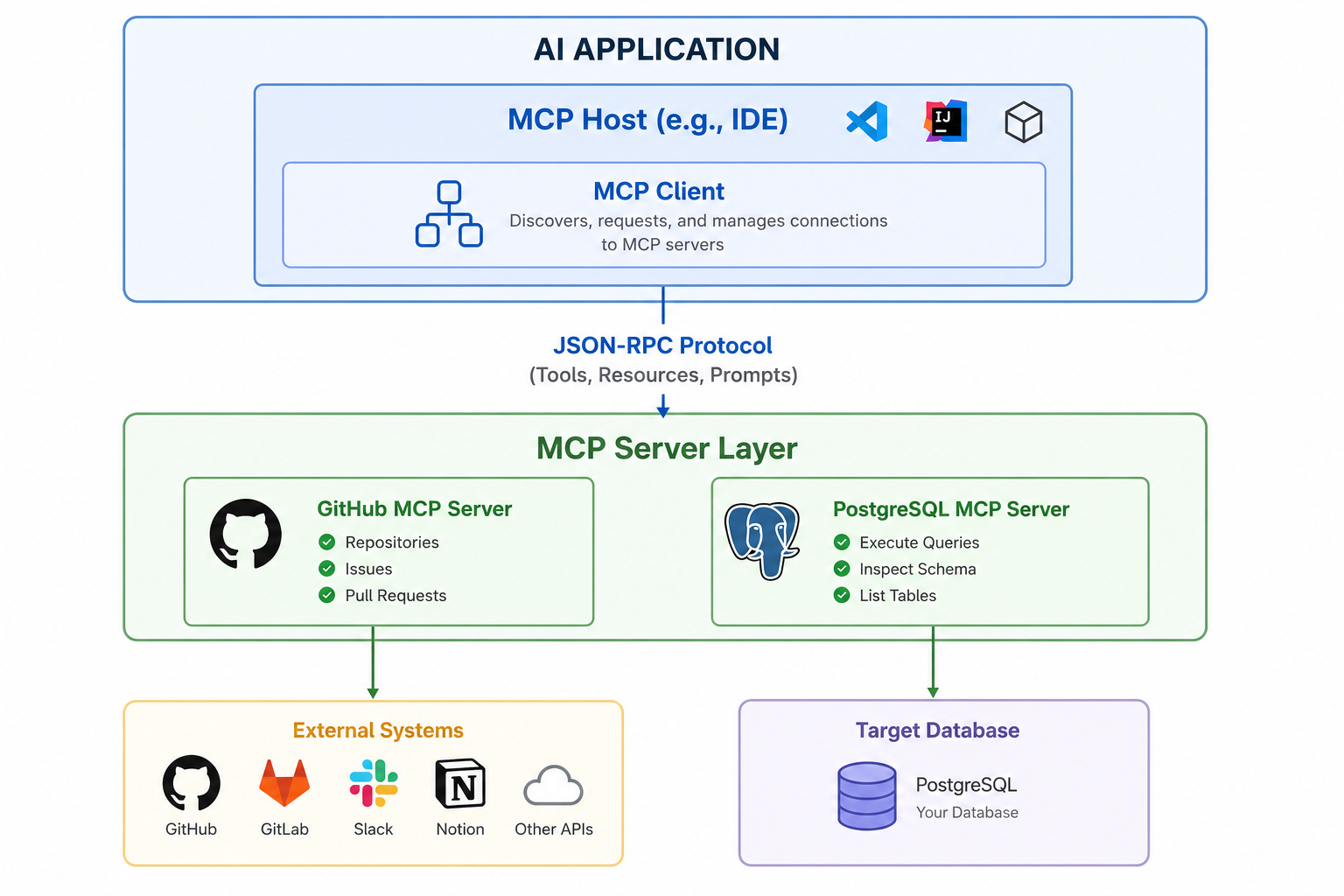
1. MCP Host (The AI Application Environment)
The Host represents the container application that end-users interact with directly. Prominent examples include Claude Desktop, Cursor, VS Code extensions, or enterprise AI frameworks. The host manages user authorization, retains the context window, orchestrates execution logic, and hosts the embedded MCP client.
2. MCP Client (The Protocol Orchestrator)
Operating within the host environment, the MCP client establishes secure connections to external MCP servers. Its core responsibilities include:
- Dynamic tool discovery and capability negotiation during startup.
- Translating model intent into structured JSON-RPC protocol requests.
- Enforcing access control policies and human-in-the-loop authorization gates.
- Passing structured tool responses and diagnostic outputs back to the model context.
3. MCP Server (The Capability Provider)
The MCP server is a lightweight application that exposes specific domain capabilities, operational tools, or structural resources to the AI client. It translates incoming protocol commands into concrete execution routines against the target system.
For instance, a specialized GitHub MCP Server might expose operations like:
- Repository.Create
- PullRequest.Create
- Issue.Read
- Branch.List
- PullRequest.Merge
Similarly, a Database MCP Server exposes safe schema exploration and query execution routines:
- Database.ExecuteQuery
- Schema.InspectTables
- Metadata.ReadStructure
Because communication follows an explicitly defined open standard, the AI model does not need custom logic for individual vendor APIs; it simply reads the server's advertised schema and executes protocol calls dynamically.
Capabilities Provided by MCP Servers
An MCP server can expose three distinct primitives: Tools (executable functions), Resources (readable data streams), and Prompts (pre-configured contextual templates).
| MCP Server Category | Capabilities Exposed to AI | Enterprise Value |
|---|---|---|
| GitHub / GitLab | Manage pull requests, query issues, inspect branches, trigger actions | Streamlines code review and release tracking directly from conversation |
| PostgreSQL / MySQL | Execute parameterized SQL, read schema structures, analyze indices | Accelerates database debugging and automated schema analysis |
| Headless Browser | Render DOM trees, interact with form fields, capture screen state | Enables end-to-end web workflow automation and dynamic data scraping |
| File System | Read file content, write files, perform diffs, traverse directory trees | Facilitates complex codebase refactoring and local document indexing |
| Slack / Teams | Retrieve channel logs, compile thread summaries, broadcast alerts | Enhances team visibility and operational incident responses |
| Notion / Confluence | Create documentation, update knowledge bases, search wiki content | Keeps organizational knowledge synchronized with operational reality |
| Terminal Execution | Execute shell commands, compile binaries, inspect system processes | Empowers AI agents to independently perform local build and test cycles |
Real-World Execution Flow
To understand the interaction between these layers, consider a practical developer prompt:
"Initialize a modern React application, set up a local Git repository, and push the initial commit to a newly created GitHub repository."
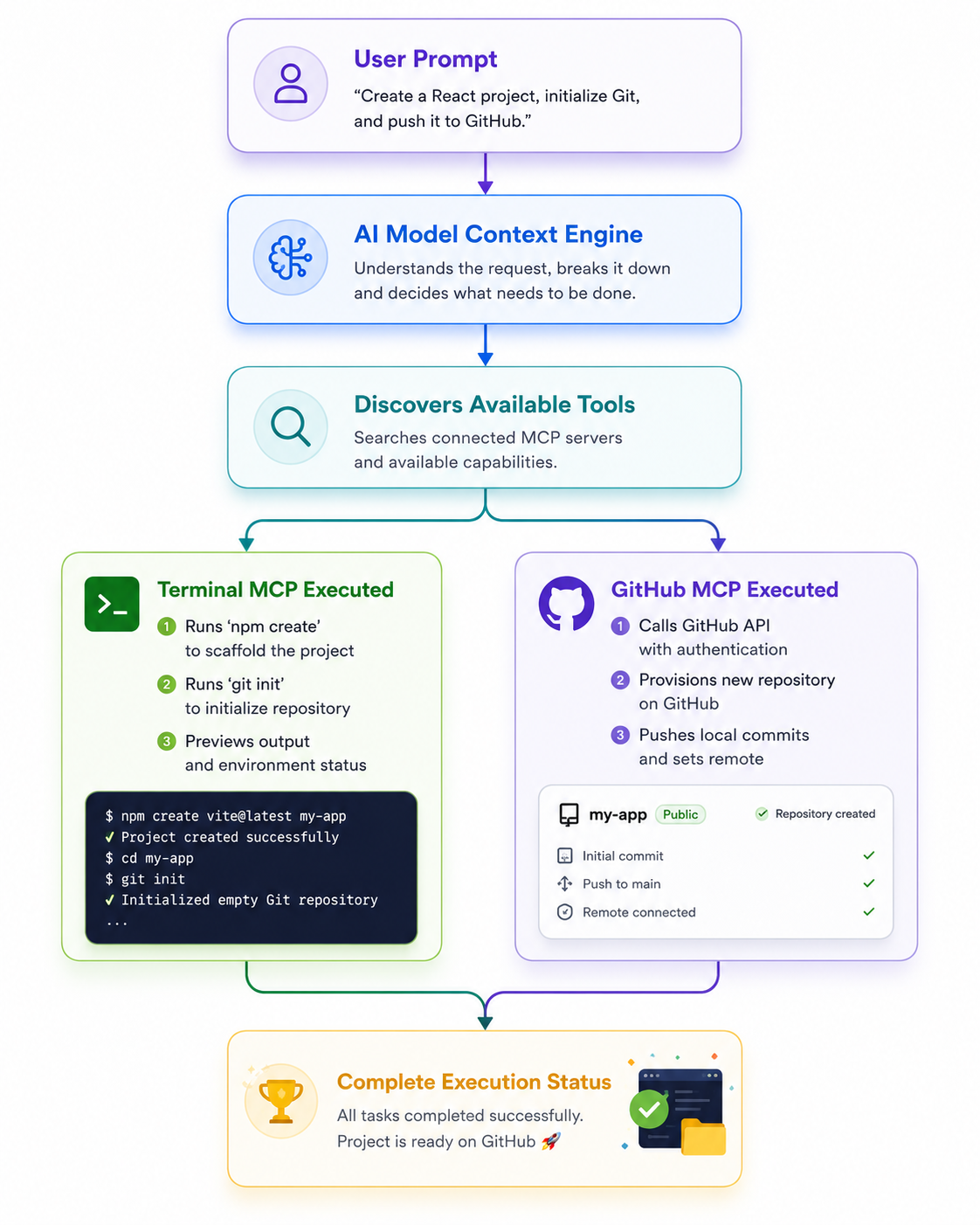
Throughout this multi-step operational sequence, the AI model remains an intelligent orchestrator. It breaks down high-level intent into sequential tool calls, delegates execution to deterministic MCP servers, evaluates incoming status payloads, and ensures the workflow reaches a successful state.
Manual Workflows vs. Agentic MCP Workflows
Transitioning from traditional developer interactions to an MCP-driven architecture significantly reduces cognitive friction and operational overhead.
Practical Scenario: Deploying an Application
1. Traditional Manual Workflow
- Switch context to the command-line interface.
- Build the distribution binary and execute local test suites.
- Authenticate against the target cloud management portal.
- Manually push assets to cloud storage or container registries.
- Trigger server restart scripts and monitor logs for potential panics.
- Manually open a browser instance to verify route availability.
2. Agentic MCP Workflow
The developer enters a single command into an MCP-enabled workspace:
"Build and deploy the current branch to staging, verify health endpoints, and post a build report to Slack."
The AI host processes the request by executing a series of protocol actions:
[System Event]: Inspecting local git status...
[System Event]: Executing local build via Shell MCP Server...
[System Event]: Deploying build artifacts via Cloud Platform MCP Server...
[System Event]: Polling HTTP health endpoints via Fetch MCP Server...
[System Event]: Posting status message via Slack MCP Server...
| Architectural Metric | Traditional Manual Approach | MCP Agentic Workflow |
|---|---|---|
| Execution Mechanics | Requires manual context switching across multiple tools | Executed through a unified, conversational context window |
| Cognitive Friction | High reliance on human memory for tool syntax and APIs | Automated syntax handling managed by server schemas |
| Workflow Efficiency | Sequential, slow, and prone to typographical errors | Rapid, deterministic execution guided by model reasoning |
| Auditing & Control | Hard to track across disparate terminal windows | Protocol logs capture structured tool calls and outputs |
Core Technical Benefits of MCP
Universal Standardization
MCP replaces proprietary function-calling frameworks with a standardized message protocol, ensuring tool definitions remain portable across any compliant AI platform.
Enhanced Reusability and Modularity
A single MCP server implementation can be reused across diverse runtime environments—from desktop applications to web-based IDEs—without modification.
Simplified Maintenance
Infrastructure providers can update their backend APIs, security credentials, or tool parameters within the MCP server without breaking downstream AI client implementations.
Enterprise Security and Isolation
MCP servers run as decoupled processes. They enforce fine-grained operational boundaries, allowing security teams to restrict sensitive file paths, database permissions, or command execution scopes.
Common Implementation Domains
The flexibility of MCP makes it highly applicable across a variety of technical disciplines:
- Software Engineering: Automate pull request reviews, perform cross-repository code searches, run unit test suites, and resolve merge conflicts interactively.
- Database Operations: Safely inspect schemas, optimize slow-running queries, generate migration scripts, and review index usage without leaving the workspace context.
- DevOps Infrastructure: Monitor container orchestrators, restart failed deployment services, stream real-time operational logs, and adjust cloud resource configurations.
- Technical Documentation: Synchronize inline source code comments with enterprise documentation platforms, preventing knowledge drift.
How MCP Interoperates with Existing APIs
A common point of confusion is whether the Model Context Protocol is designed to replace traditional REST or GraphQL APIs. It does not. Traditional APIs remain the foundational operational layer for software communication. MCP sits directly on top of these interfaces as an intelligent translation protocol.
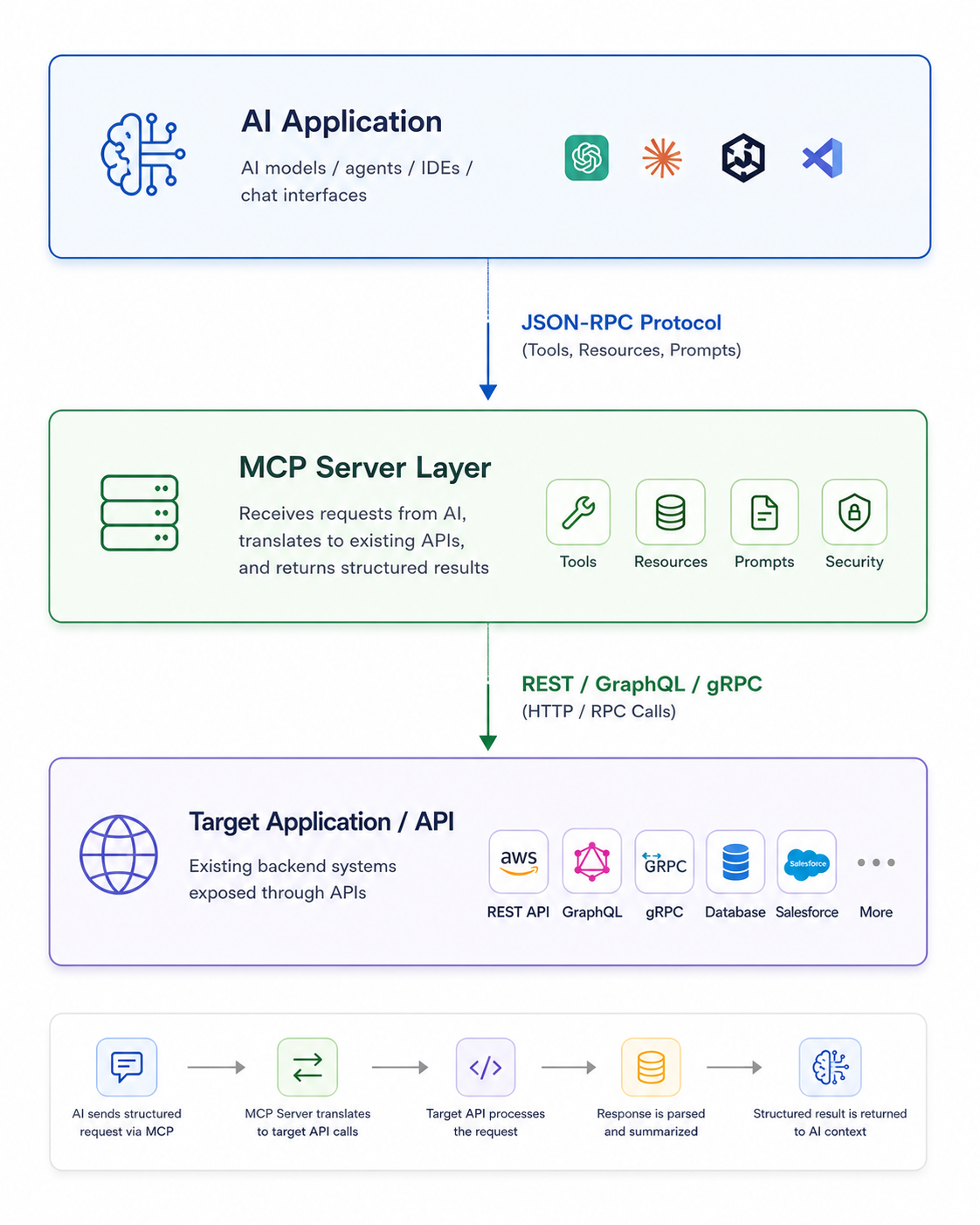
The MCP server accepts structured protocol requests from an AI model, translates them into standard HTTP or RPC calls against backend systems, parses the raw payload responses, and feeds structured summaries back into the model's context window.
Architectural Horizon
As AI systems transition from static text generators to fully autonomous agents, standardized interoperability becomes vital to software engineering stack design. Building individual integration pipelines for every platform creates unmanageable technical debt.
By establishing a clean boundary between model reasoning and operational execution, the Model Context Protocol provides an extensible framework for modern software interaction. Developers can write tool logic once using a shared protocol, enabling their applications to participate in a rapidly expanding universe of intelligent AI interfaces. MCP turns AI from an isolated assistant into a fully integrated execution layer across the digital tools we rely on every day.